

Imagine walking into a bustling car dealership. Instead of being bombarded by a rapid-fire pitch about horsepower, mileage, and safety features, you’re simply handed the keys to a shiny new vehicle. The engine hums to life beneath your fingers, the leather seats cradle you in their plush embrace, and as you glide through the lot on that effortless test drive, you can already envision yourself steering this beauty down your driveway. This is the magic of a product demo that speaks for itself—a tangible, experiential glimpse into the product’s real value.
In this expanded guide, we’ll dive deeply into every aspect of crafting a product demo that naturally seals the deal. Whether you’re showcasing software, physical goods, services, or even intangible benefits, these strategies ensure your audience leaves not just informed but exhilarated. A perfectly executed product demo doesn’t just sell; it embodies authenticity, demonstrates empathy toward the user’s challenges, and paves the way for genuine trust. Ready to dig in? Let’s explore how to turn any product demo into an engaging, story-driven experience that makes people clamor for more.
Step 1: Understand Your Audience
Before filming a single frame, writing a single line of text, or designing a single graphic, you must come to grips with the people who will be watching your product demo. A stellar product demo is never a purely mechanical demonstration; it’s a targeted communication piece. The central question is: Who are you talking to, and what do they truly care about?
Identifying Pain Points and Needs
People invest in solutions that speak directly to their challenges. When prospective customers watch your product demo, they’re essentially looking for a bridge between their current frustrations and a better future. Some might be overworked, grappling with time constraints, or bogged down by complex tasks. Others may be novices in search of an easy, foolproof tool that does the heavy lifting. A well-designed product demo pinpoints these pain points with laser accuracy:
- Efficiency: Does your product cut down on time-consuming tasks?
- Cost-Effectiveness: Is it a cheaper alternative than existing solutions?
- User-Friendliness: Can non-experts grasp it quickly?
- Scalability: Will it evolve as their needs grow?
If you’re working on a software-as-a-service (SaaS) product, maybe your audience is drowning in spreadsheets or tired of juggling multiple apps that don’t integrate. If your product is a physical gadget, perhaps they’re tired of items that break easily or are complicated to set up. Your product demo should highlight how your offering eliminates these daily struggles.
Pro Tip: Gather real customer testimonials or user feedback. Nothing refines your product demo messaging like listening to how your actual audience describes their headaches and how they overcame them with your solution.
Adapting Your Demo to Different Buyer Personas
Not everyone interacts with a product from the same vantage point. A single product demo that lumps all viewers together may fall flat for large swaths of your potential market. Consider the example of a time-tracking SaaS platform:
- CEOs & Decision Makers: They’re looking at bottom-line ROI and how quickly they’ll see a return on their subscription.
- HR Departments: They’re keen to solve issues of compliance and accurate reporting for payroll.
- Team Leads & Managers: They want oversight tools, ways to manage productivity, and immediate visual dashboards.
- Individual End Users: They need a straightforward interface that won’t bog them down with complexities.
Each group has distinct motivations. Adapting each product demo with tailored messaging ensures you speak their language, address their concerns directly, and show them the path to resolution.

Step 2: Script a Story-Driven Demo
People remember stories. Statistics can resonate, but a story weaves an unforgettable narrative that sparks emotion. When constructing your product demo, envision guiding viewers through a short but compelling storyline in which your product is the hero.
The 3-Part Story Framework
- The Problem
Kick off by describing a scenario that mirrors your audience’s daily frustrations. Maybe it’s an overwhelmed office manager juggling endless tasks, or a software developer debugging code with no centralized system. - The Solution
Enter the hero—your product. In a gradual, insightful manner, illustrate how your solution addresses each stumbling block. Describe how your product’s features map onto the user’s pain points, or physically show the process if it’s a tangible product. - The Transformation
Reveal a world improved by your product’s capabilities. If it’s a digital platform, show a before-and-after comparison of messy spreadsheets versus streamlined analytics dashboards. If it’s a physical product, highlight how it saves time, reduces manual labor, or enhances quality of life.
Breathing Life into Your Script
Think about a product demo for a next-generation blender. Instead of rattling off RPMs, talk about the busy parent who can’t waste time on high-maintenance appliances. Capture them in the act of struggling with meal prep, then seamlessly segue into how a single press of a button on your blender speeds through cooking tasks. Wrap up by showing them enjoying a freshly blended smoothie, free from lumps and frustration. The emotional payoff is clear: convenience, health, and happiness.
Pro Tip: Whether you have a voice-over or appear on camera, adopt a tone that connects. If your audience is casual consumers, keep it friendly and informal. For technical buyers, integrate data points and more sophisticated language that underscores the advanced capabilities of your product.
Step 3: Show, Don’t Tell
An exceptional product demo is built around the principle of showing real-world applications rather than telling viewers what they should believe. Nothing kills enthusiasm faster than a lecture. Audiences prefer active demonstrations, crisp visuals, and tangible outcomes.
Essential Visual and Interactive Elements
- Live Walkthroughs
If it’s software, walk viewers through the interface. Click the buttons. Demonstrate exactly how tasks are completed. For physical goods, focus on how it looks, feels, and performs under real conditions. Showcase its functions in an engaging, hands-on way. - Before & After Shots
Transform the intangible into something viewers can immediately grasp. If your solution shortens a process from hours to minutes, illustrate that visually. Timers, side-by-side video shots, or result-oriented slides underscore improvements concisely. - Competitive Comparisons
If applicable, hold your product beside a competitor’s offering. Show the differences in design, ease of use, or output quality. However, tread carefully to maintain professionalism—audiences respond to authentic comparisons over blatant bashing. - User Testimonials
Insert short clips of real user stories or quotes praising the product’s performance. This social proof bolsters credibility and helps viewers envision themselves achieving similar positive outcomes.
Making Technical Concepts Accessible
Complex data or intricate product details can alienate viewers if not presented clearly. Infographics, simple analogies, and screen annotations can be used to simplify advanced functionalities. For instance, if your product uses advanced machine learning, you might illustrate it with a visual showing how data is fed into an AI model to produce time-saving recommendations for users, rather than diving into dense jargon.
Pro Tip: Whenever you reference a product feature, guide the viewer visually. Highlight or circle the feature. Show a cursor movement or zoom in. In a physical product demo, go for close-up shots that emphasize the textures, buttons, or unique design elements.

Step 4: Make It Engaging & Concise
Even a phenomenal product demo can fail if it drags on. In an age where social media and digital content continuously vie for people’s attention, brevity is key. The challenge is to compress maximum impact into the tightest runtime possible, without skipping essential details.
Best Practices for a Crisp, Engaging Demo
- Aim for 3-5 Minutes
If your product’s complexity demands more depth, consider chaptering your demo into distinct sections. This modular structure allows viewers to jump to the features most relevant to them. - Dynamic Pacing
Keep the tempo lively. Move swiftly from one feature to the next without lingering too long. Use transitions that cleanly lead viewers forward, maintaining the momentum. - Conversational Narration
Address viewers as if in a one-on-one conversation. Enthusiasm and authenticity in your voice convey confidence in your product. - On-Screen Text & Highlights
Subtle annotations and on-screen callouts direct viewer attention exactly where you want it. This is particularly useful for software or smaller product details that might be lost in a wide shot. - Rhetorical and Direct Questions
Occasionally pepper in queries to keep the audience mentally engaged. “Have you ever wished you could speed up your daily accounting tasks?” triggers the viewer to reflect on their specific needs.
Pro Tip: Build a short teaser or “trailer” for your product demo—a 30- to 60-second clip that encapsulates the product’s main selling points. Use it to pique interest, then link to a full, more detailed demonstration for those who want deeper exploration.
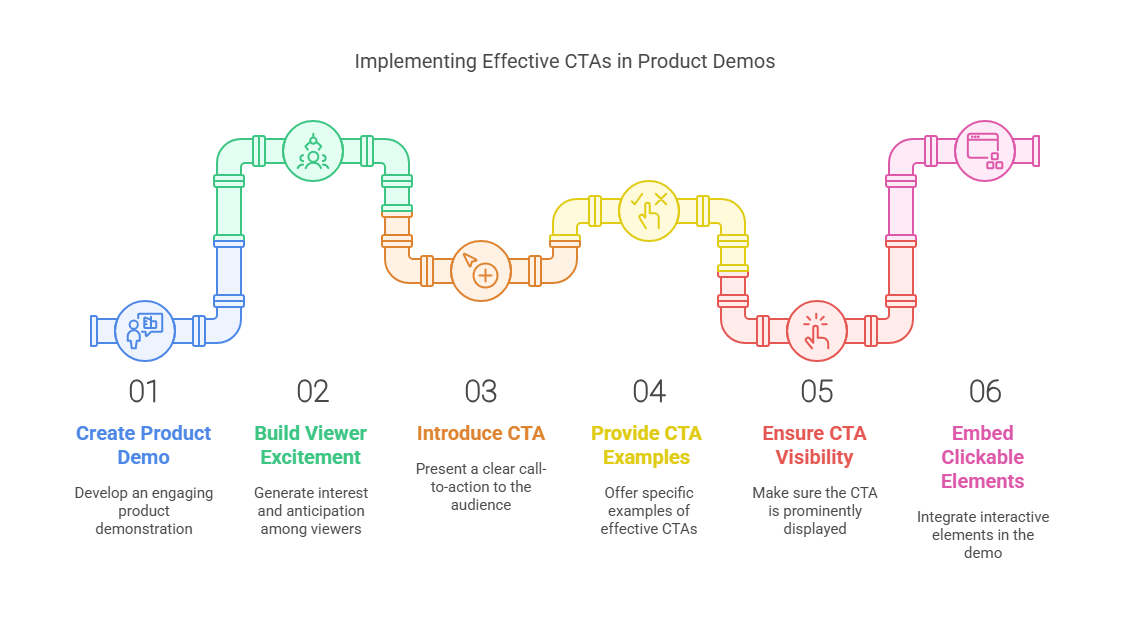
Step 5: Add a Clear Call-to-Action (CTA)
Even the most compelling product demo means little if it’s left floating without a strong push to the next step. After building excitement and illustrating your product’s potential, you must direct viewers toward an immediate action that progresses them down the sales funnel.
Examples of Persuasive CTAs
- “Start Your Free Trial Today”
Invites immediate hands-on experience, eliminating the risk for the consumer. - “Book a Personalized Demo”
Perfect for complex offerings requiring a deep-dive session with specialized features. - “Download Our Full Case Study”
Encourages prospects to learn more and see real-life success metrics from existing clients. - “Contact Our Sales Team”
Straightforward for enterprise-focused products that mandate multi-stage purchasing decisions.
Ensure your CTA is noticeable and seamlessly fits into the overall flow of your product demo. If you can embed clickable elements in the video itself, even better—some platforms allow interactive overlays that drive immediate action while interest is at its peak.
Pro Tip: For software-based product demos, you can incorporate a button that opens a sign-up form or scheduling calendar directly in the viewing window. Removing friction between discovery and action can significantly boost conversion rates.
Step 6: Test & Optimize for Maximum Impact
A product demo isn’t carved in stone. In fact, iterative refinement is the hallmark of a successful marketing strategy. After publishing your product demo, gather as much data as possible: watch times, bounce rates, direct feedback, and conversion stats.
Key Metrics to Track
- View Completion Rate
If viewers drop off 30 seconds into your video, it’s a sign your opening needs more impact. - Engagement Rate
Check if viewers are pausing, rewinding, or re-watching key segments. This indicates which parts are compelling or confusing. - Conversion Rate
Are they following your CTA? A surge in sign-ups or inquiries post-demo signals success. - User Questions & Comments
If repeated questions about the same feature arise, you may need to clarify or reorganize your product demo to address that confusion upfront.
A/B Testing for Continuous Improvement
Split testing different versions of your product demo can be a goldmine of insights. Tweak your opening line, CTA placement, or highlight different features in each variant to see which resonates best. Over time, these incremental refinements will yield a polished, high-converting product demo that practically sells itself.
Pro Tip: Keep a feedback loop with your sales or customer service teams. They can inform you about recurring objections or complaints, which you can then incorporate and preempt in your updated product demo versions.
Step 7: Beyond the Basics—Advanced Tips for a Legendary Product Demo
Now that you’ve covered the essentials, let’s dive deeper into advanced tactics that can elevate your product demo beyond the mundane. While not every brand needs these features, integrating them skillfully can help you stand out in a crowded marketplace.
1. Interactivity and Personalization
Modern platforms increasingly enable interactive demos. For a software product demo, you might let users click through a mock interface in real-time or provide them with scenario-based branching (“If you’re looking for analytics, click here; for collaboration features, click there.”). Personalization fosters a sense of ownership and invests the viewer more deeply in the product.
Implementation Example: A marketing analytics tool could present a brief questionnaire at the start of the product demo. Based on the viewer’s answers, the video or on-screen walkthrough tailors the experience to emphasize relevant dashboards, metrics, and integrations.
2. Augmented Reality (AR) & Virtual Reality (VR) Elements
Physical products or experiential services can benefit from AR or VR enhancements. Picture a VR headset that places prospective homeowners inside a virtual model property. Or an AR smartphone app that overlays your new furniture design in a customer’s living room. If you can replicate these immersive experiences in your product demo, you instantly capture your viewer’s imagination.
Implementation Example: A home improvement brand might build an AR feature where users scan their living room with a phone camera, then watch a product demo of new light fixtures or paint colors seamlessly superimposed onto their actual walls. This synergy between real-life context and product demo can be incredibly persuasive.
3. Gamification
People love to play. By embedding fun, game-like mechanics into your product demo, you make the discovery phase more memorable. A quiz, a simulation, or a mini-challenge can keep viewers engaged longer while reinforcing the key selling points of your product.
Implementation Example: An employee training platform might offer a short interactive game to highlight its features: each level underscores a different capability, making viewers feel rewarded each time they explore a new function.
4. Emotional Triggering
Though your product demo should remain fact-driven, weaving emotional undertones can heighten impact. Music selection, color schemes, narrative arcs, and even personal anecdotes from existing customers can amplify empathy and excitement.
Implementation Example: For a medical device product demo, you might focus on a testimonial from a patient whose life dramatically improved after using the device. The relief and gratitude in that patient’s story taps into a universal longing for better health and well-being.
Pro Tip: Before integrating advanced techniques, assess your audience’s technological comfort and your own budget or production timeline. It’s better to execute a simple, polished product demo than to produce a sloppy, over-ambitious interactive experience that distracts from your core message.

Step 8: Common Pitfalls and How to Avoid Them
Even veteran marketers can stumble when designing a product demo. Let’s address some frequent missteps so you can circumvent them with ease.
- Overloading with Features
It’s tempting to present every cool bell and whistle. But a too-lengthy or cluttered product demo can obscure your product’s primary advantage. Prioritize clarity over quantity—less is often more. - Failing to Show Real-World Context
Listing features without anchoring them in everyday challenges robs your demo of relatability. Weave each capability into a context or scenario your viewers can see themselves in. - Ignoring Production Quality
While a big-budget film crew isn’t always necessary, avoid shaky camera footage, muffled audio, or poorly lit scenes. These flaws can undermine trust in your brand’s professionalism. - Underestimating the Power of Editing
Unedited demos might include unnecessary pauses, stumbles, or filler words that lose momentum. Crisp editing elevates your product demo from a rough draft to a refined, compelling narrative. - Skipping the CTA or Making It Too Subtle
A half-hearted “Contact Us” message might slip under the radar. CTA placement should be bold, well-timed, and actionable. - Neglecting Feedback Loops
Launching your product demo and never checking back on its performance robs you of valuable optimization opportunities. Regularly review metrics and incorporate learnings into updates or future demos.
Step 9: Real-World Examples of Product Demo Success
Observing how market leaders deploy product demos can provide a wealth of inspiration. Below are a few scenarios in different industries illustrating how the strategies in this guide come to life:
1. SaaS Cybersecurity Platform
- Audience: CIOs, CISOs, and Security Teams.
- Demonstration Style: A short, story-driven video showing a data breach scenario, then revealing how the platform instantly identifies and quarantines threats.
- Key Features: Real-time alerts, one-click remediation, and compliance dashboards.
- Impact: By leading with a high-stakes problem—data breaches—the demo resonates with decision-makers. The transformation reveals how quickly the platform restores normal operations, alleviating anxieties tied to cybersecurity threats.
2. Home Kitchen Appliance
- Audience: Busy families, home chefs, and food enthusiasts.
- Demonstration Style: A mother preparing breakfast in under five minutes using the new multi-functional appliance.
- Key Features: Quick-cook mode, auto-clean function, and child safety lock.
- Impact: This product demo highlights real pain points (limited time, messy cleanups), showing how the product simplifies cooking and fosters healthier eating.
3. B2B Project Management Tool
- Audience: Department managers, remote teams, and freelancers.
- Demonstration Style: Screen capture walk-through focusing on how tasks are assigned, tracked, and completed.
- Key Features: Automated scheduling, Gantt charts, integration with popular collaboration apps.
- Impact: The story centers on a harried manager struggling with conflicting deadlines. The transformation shows tasks neatly organized, deadlines visually mapped, and team members happily in sync.
Each of these success stories relies on the core elements we’ve discussed: a relatable context for the viewer, a concise narrative arc, and a thorough demonstration of the product’s tangible benefits.
Step 10: Elevate Your Product Through Demos
A powerhouse product demo is your golden opportunity to let the product do the talking. It bridges the gap between consumer curiosity and confident purchase decision. By addressing real needs, telling a compelling story, showcasing tangible results, and delivering a well-timed CTA, you’re not just selling—you’re offering a vision of what’s possible.
But remember: the journey doesn’t end once you publish a product demo. Continuous feedback, iterative testing, and thoughtful updates keep your demo relevant and high-converting. As audience preferences evolve, so should your approach.
Above all, authenticity is key. If your audience senses you believe in the product, if your excitement is sincere, and if the scenario you present mirrors their real-life challenges, they’ll be far more likely to take the next step. Follow these steps, and your product demo will not only sell itself but could also become your brand’s standout ambassador in a crowded, fast-moving marketplace.
Final Word: The Endless Potential of a Well-Executed Product Demo
A product demo is more than a tool; it’s an experience. It’s the handshake, the conversation starter, the proof that you stand behind your offering. Through careful research into audience pain points, masterful storytelling, and skillful editing, you convert skeptics into believers. Ultimately, a polished product demo can become a brand asset that works tirelessly across social channels, email campaigns, online ads, and your own website.
As you continue refining your product demo approach, keep in mind that innovation and adaptability are your allies. Technology evolves, audiences shift, and your product may expand with new features. With each iteration, strive to stay relevant, engaging, and genuinely helpful. Soon, you’ll discover your product demo has become not just a marketing piece, but a powerful catalyst for long-term customer satisfaction and brand loyalty.
Remember, this isn’t a one-way street. Encourage customers and prospects to share their experiences and questions. That feedback loop ensures your next product demo is even better. The more your audience feels heard and sees that your product genuinely addresses their needs, the smoother your route to enduring business success.

- Book: Product Demos That Sell: How to Deliver Winning SaaS Demos by Steli Efti
- Book: Product-Led Growth: How to Build a Product That Sells Itself by Wes Bush
- Book: Demotainment: The Art of Delivering Demos That Engage, Inspire, and Drive Results by Mike McDowell
